A clearer way into WordPress is taking shape.Meet the alpha ↗

Temporary access for WordPress

Their skills.
Your rules.

Your developer needs a way in. You need to stay in control. Give them their own access, a clear end time, and the permissions for the job.

A useful free core. Built for better WordPress handovers.
A large mint key
TEMPLOGIN / ACCESS PASS
Jordan Davisjordan@example.com
Contributor · 24 hoursInvited
Good work in.
Loose ends out.
Product illustration · Example identity and access window
Invite.Set limits.Stay informed.Close access.

A BETTER WAY TO HAND OVER THE KEYS

A little access.
A lot more peace of mind.

Bring in the person who can help. Keep the decisions that matter: who gets in, what they can do, and when their access ends.

Your site.
Your pause button.

Work changes. Plans change. Access should be something you can review and act on, without losing the record of the engagement.

  • One person. One access record.
  • Expiry belongs to the grant.
  • Pause, extend or close the window.

Try the buttons. This browser demo uses sample data and does not change a real WordPress site.

WORDPRESS / TEMPLOGIN

Temporary access

Interactive preview
Jordan Davisjordan@example.com · Content support
Active
PERMISSION
Contributor · Sample scope
TIME REMAINING
3 hours, 24 minutes
Approved by site ownerExpires today · Sample time
Activity timelineSample events
  • Updated draft post
  • Signed in · Verification complete
  • Access approved by site owner

Illustrative interface. No connection to a WordPress site.

FROM “CAN YOU HELP?” TO “ALL DONE.”

The whole handover.
Thought through.

Useful controls, understandable decisions, and a clear next step for the people doing the work.

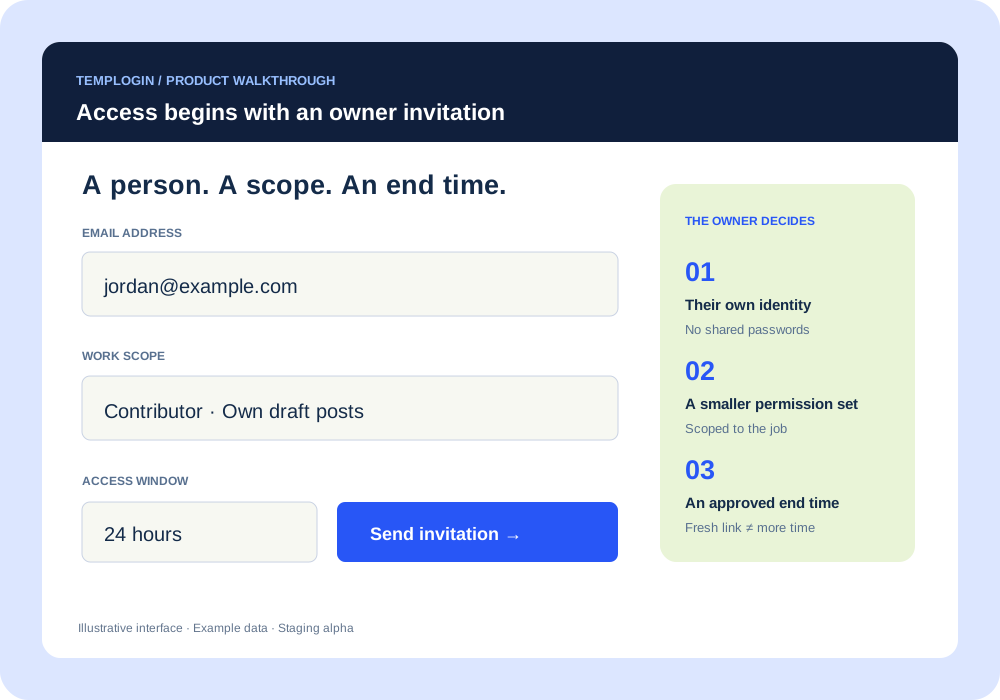
Illustrated owner invitation showing email, work scope and a 24-hour window
Owner invitation · Illustrated alpha interface
01 / INVITE WITH INTENTION

A person.
A job. An end time.

Start with their email. Give the person helping you a separate identity, the right work scope and an approved window. Keep your own credentials to yourself.

  • Individual invitations and access records
  • Permissions chosen for the work
  • A fresh sign-in link does not extend access
A closer look at invitations
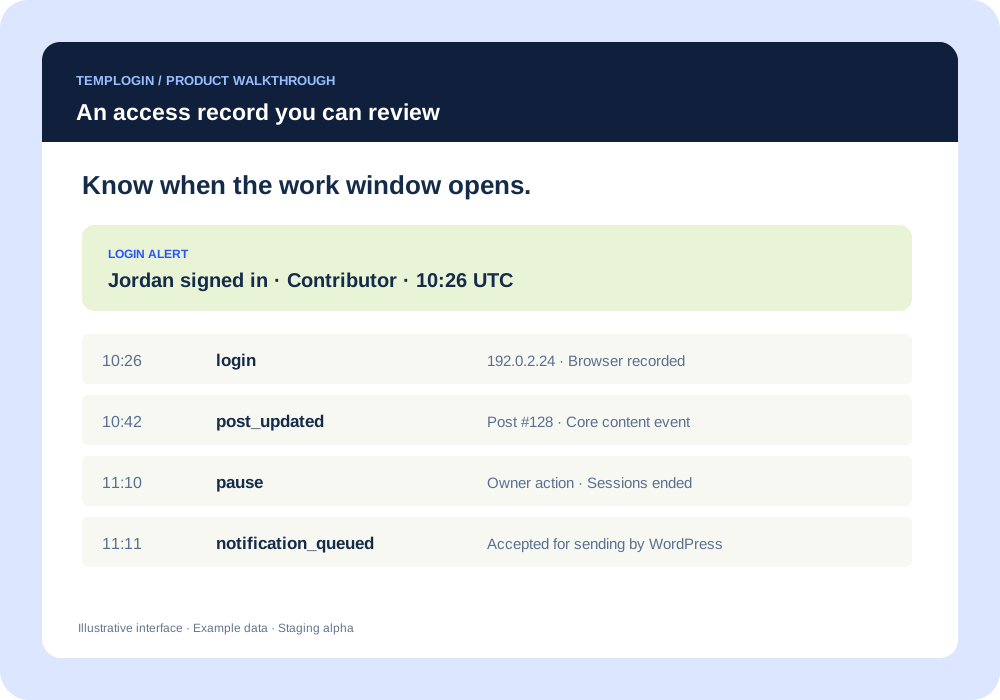
Illustrated record of a login, a content update and an owner pausing access
Supported access and content events · Example data
02 / KEEP YOUR BEARINGS

See the arrival.
Follow the activity.

Connect the access decision to the work. Login alerts and supported activity events give you a record to review, while pause and revoke give you a way to respond.

  • Login time, connected IP and browser details
  • Documented core-content event coverage
  • Local records and CSV export
Explore the activity record
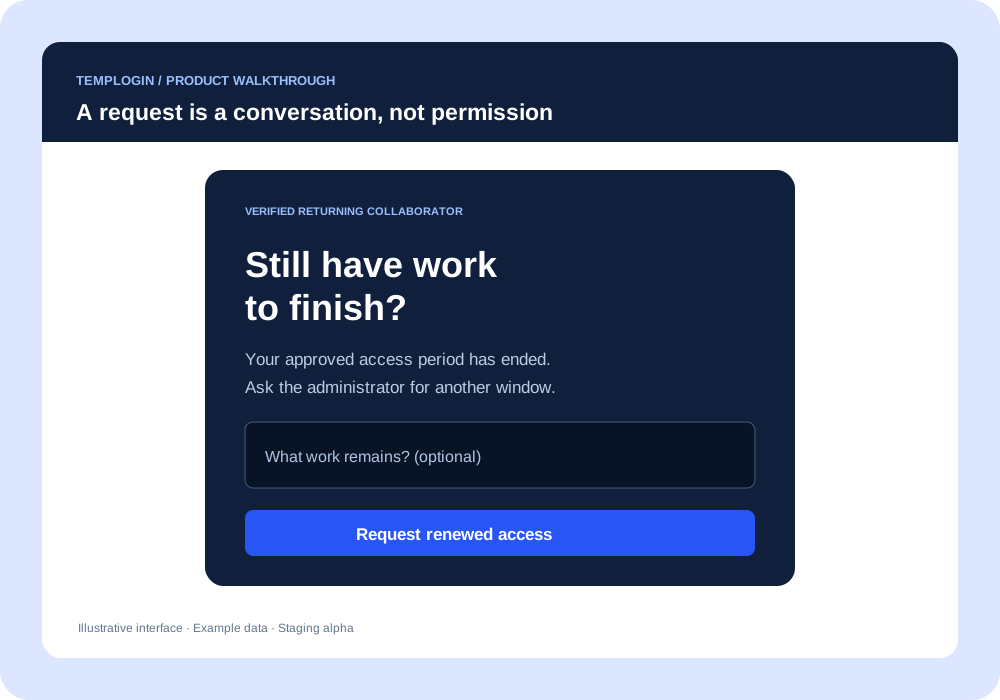
Illustrated renewal request for a verified person who previously had access
Verified returning collaborator · Approval required
03 / LEAVE NO OPEN ENDS

More work left?
Make a new decision.

A previous collaborator may need another window. Let them explain what remains, then decide. A request creates a conversation; approval creates the access.

  • Previously approved people, on the same site
  • First-time access always starts with an invitation
  • Blocks and revocations take precedence
How renewal works

BUILT AROUND THE PEOPLE DOING THE WORK

Different responsibilities.
One clearer handover.

FOR FREELANCERS

Get to the good work.

Your own invitation, a defined scope and a clear end time. When the work needs another window, ask through the approved renewal flow.

FOR OWNERS & AGENCIES

Stay in the picture.

Know who has access, close completed engagements, and keep the record. Business workflows will add projects, vendors and approval routing.

FOR GOVERNANCE TEAMS

Make decisions count.

The Enterprise direction adds independent approvals, access reviews and external evidence. Those organisation workflows are future development.

TRY THE OTHER SIDE OF THE DOOR

A clear message.
A sensible next step.

Preview the proposed collaborator experience. These examples do not sign you in, send emails or change real access.

Returning collaborator · Identity verified

Still have work to finish?

Your approved access period has ended. Request more time from the site owner to continue.

Only someone previously granted access to this site can request renewal.

A FREE FOUNDATION. ROOM TO GROW.

Good access control.
At every size.

Start with the essentials. Add the coordination and policy your team needs as it grows.

Proposed launch editions and pricing · USD · In development, not available to purchase. Prices are for review.

THE ESSENTIALS, FOR EVERY SITE

Free

A useful core for personal and business websites.

$0 / foreverCore local controls · No licence key proposed.
  • Individual invitations and expiry
  • Pause, revoke and end sessions
  • Login alerts and core activity records
  • Owner-approved renewals
  • Optional authenticator MFA in the Free roadmap
MORE PEOPLE. BETTER COORDINATION.

Business

For companies and agencies managing outside help.

$79 / yearProposed · 3 sites · Before applicable tax.
  • Everything in the proposed Free edition
  • Custom permission templates
  • Project and vendor records
  • Approval routing and maintenance windows
  • Detailed activity and handover reports
POLICY WITH A BIGGER PICTURE

Enterprise

For organisations with formal access-review needs.

Let’s talkCustom quotation · Sites and service agreed.
  • Everything in the proposed Business edition
  • Mandatory authentication policies
  • Independent approvals and access reviews
  • Business reasons and ticket references
  • External logging and audit evidence

Compare editions and pricing details

STRAIGHT ANSWERS

A few things
worth knowing.

Can I install TempLogin today?

A limited WordPress alpha is being tested privately on staging. It is not a public production release. See exactly what exists ↗

Can anyone request access to my site?

No. First-time access starts with an owner invitation. Renewal requests are for verified people who previously had an approved temporary grant on that same site. A pending request grants no access.

Can a business keep using Free?

Yes, that is the proposed model. Paid editions add coordination, policy, integrations and support. Being a business alone is not the upgrade trigger.

Does the activity record capture everything?

No. It covers documented, supported events. It is not screen recording or complete server monitoring. Server and database administrators can modify in-site evidence. Read the security approach ↗

What about WordPress.com and enterprise compliance?

WordPress.com compatibility will be published after testing plugin-enabled environments. TempLogin does not certify a site or organisation to ISO 27001. Proposed approval and evidence workflows can support wider security processes.

THE FIRST ALPHA IS TAKING SHAPE

Real foundations.
A bigger product ahead.

The alpha includes owner invitations, limited Contributor/Author scopes, expiry, pause/revoke, session termination and core event logs.

Staging evaluation only

MFA, broader roles, and Business/Enterprise workflows remain future work. The illustrations and demos explain the wider product direction.

Follow the build

LET’S MAKE THE NEXT HANDOVER BETTER

Open the right doors.
Close the loose ends.

Give people access regularly? Tell us what your workflow needs.

Talk about TempLogin